You can now drag cards to prioritize in Multi Board Kanban
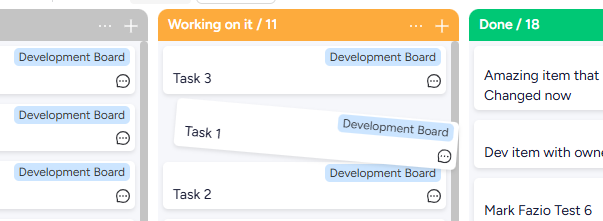
Drag to reorder, right inside your Kanban list
Hi there,
This is one of the most requested things we've heard, and honestly it's probably one of the reasons some of you tried Multi Board Kanban but never made it a regular part of your workflow. You could sort a list, but you couldn't actually prioritize it by hand. That's fixed now.
You can drag cards up and down within a list and set your own order. Most important at the top, not just the latest change at the top.

What's new
Until now, ordering inside a list meant sorting by a column. Numeric values, alphabetical, a priority column, that kind of thing. Useful, but it's still the data deciding the order, not you.
Manual reordering lets you set the order yourself. Drag a card wherever it should sit and it stays there. For anyone doing backlog prioritization, this is the part that was missing. You decide what's at the top, instead of the newest item always winning.
Why it matters
If you plan your week or groom a backlog inside your board, you want the top of the list to mean "do this first," not "this changed most recently." Now it can. Pull the three things that actually matter to the top of each lane and leave them there.
How to turn it on
It's off by default, so you activate it per view:
Open the Sort section of your view, where your existing sort options live.
At the bottom, check Allow manual sorting.
Drag cards to reorder within any list.

A couple of things worth knowing:
The checkbox only becomes available when you're on the default sort (last change time, latest first). If you're sorting by another column, switch back to the default and the option will light up.
Your manual order is saved to that specific view. Create another view and it starts fresh, and changing the sort settings won't preserve the manual order.
Tell us how it goes
If drag-to-prioritize was the thing you were waiting for, give it a try and just reply to this. We'd love to hear whether it fits how you actually run your backlog, and what you'd want next.
Kranthi from ThoughtFlow