Changelog

Follow new updates and improvements to ThoughtFlow.

A free session to map your process
Hi there ,

Quick question: if you had to hand your workflow to a new hire tomorrow, could you write down the actual rules, not just the board?

Most teams can't. The process lives in someone's head, half-enforced by manual reminders, and every board clone drifts a little further from how work is actually supposed to happen.

This is probably useful if you're the one who owns how work moves across your team, not just working inside one board. If that's not you, feel free to forward this to whoever is.

We're building a process governance layer for monday, called Pipelines, and before we finish it we want to make sure it actually fits how real teams like yours operate. So we're offering free process mapping sessions to a small group of Multi Board Kanban customers.

In 45 minutes we'll map your process together: stages, gates, the fields that have to be filled before something moves forward. You walk away with a clear picture of your own process, which most teams don't have written down anywhere. If we can't get through the whole thing in one sitting and you find it useful, we can pick it up in a follow-up session.

As a thank you, you'll be first in line for early access to Pipelines once it's ready.

We're only doing this with a handful of teams, since it's hands-on. Grab a time here: 

https://calendly.com/thought-flow/process-mapping-workshop

Warm Regards,
Kranthi
Founder - ThoughtFlow apps for Monday.com

Scaling Kanban is now easier with Board Standardization and Saved Filters

Setting up a multi-board Kanban shouldn't feel like a chore. This update tackles two friction points that come up the moment you start working across multiple boards: getting them aligned, and navigating your data once they are.


Board Standardization

What's new

When you combine multiple boards into a single Kanban view, every board needs to share the same anchor field, stage statuses, and card property fields. If a board is missing any of those, you used to have to find and fix each one manually.

Board Standardization scans all boards in your view, highlights exactly what's missing and where, and lets you fix everything with one click. Fix a single field, fix one board, or fix all boards at once.

You'll also notice a new indicator in the Kanban toolbar: if there are any structural inconsistencies between your boards and your Kanban configuration, the toolbar highlights them so you're never left guessing why something looks off.

Why it matters

You've got your Kanban working for one workflow, and now you want to pull in boards from other projects, other teams, or other clients. Those boards weren't built with the same conventions. Maybe someone used different field names, or a status field is missing entirely. Getting everything aligned was tedious enough to make people hesitate before adding new boards. Now you can pull in any board and get it production-ready in seconds.


Saved Filters

What's new

You can now save any combination of filters with a name and come back to it later. Set your criteria, hit save, give it a name, and that filter is available anytime. Switch between saved filters without losing anything. Saved filters are per view and available to everyone who uses that view.

Why it matters

Every time you wanted a different slice of your data, you'd lose whatever filters you had set up. Want to check all items due next week, then switch to see everything completed? That meant rebuilding from scratch. Saved filters let your whole team move between different views of the same board set without the friction.


Kranthi from ThoughtFlow

P.S. We're researching how teams handle automations across multiple boards. If you've set up automations on any of the boards in your Kanban views, I'd love to hear how that's working for you. Just reply "Automations" and I'll follow up.

Multi Board Kanban now supports Me (Dynamic) filter and we're thinking about Multi Board automations

What's new

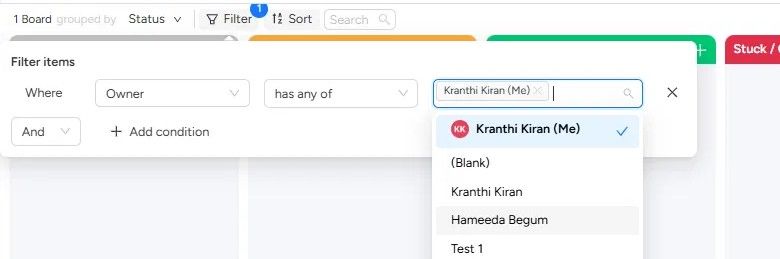
When you filter by a people column (like Owner or Assignee), you'll now see a "Me" option right at the top of the list. Pick it, and the view instantly shows only items assigned to you.

The filter is dynamic: it resolves to whoever is viewing. So on a shared kanban, every teammate can apply the same filter and see their own work. No scrolling through a long list of names to find yourself.

Why it matters

If your team shares a kanban view, you've probably hit this: someone filters the view to their name, and the next person who opens it sees an empty board. They think something's broken, or they waste time resetting the filter. Some teams worked around this by creating separate views for each person, but that means keeping all of them consistent whenever the setup changes. It doesn't scale.

The "Me" filter fixes this at the root. Because it resolves to whoever is looking, the whole team can use the same view with the same filter applied. One person sees their items, another sees theirs. No collisions, no confusion.

That also means this is a view worth bookmarking. Set up your kanban across your boards, clients, or projects, apply the "Me" filter once, and you have a single place to see what's on your plate. Every time you open it, it's already scoped to you.

How to use it

  1. Open your kanban view.

  2. Click Filter in the toolbar.

  3. Set the condition to a people column (Owner, Person, etc.) and choose "has any of."

  4. You'll see your name with (Me) next to it at the top of the list. Select it.

  5. The view now shows only items assigned to you.

Works on any people column, across any boards in the view.


Something we're exploring: Multi Board Automations

One thing we keep hearing from teams running work across multiple boards: automations break when you duplicate them. You set up a recipe on one board, copy it to five others, and within a month they've all drifted. Someone tweaks the trigger on board 3. Someone forgets to add the recipe to board 6. Nobody notices until something falls through.

We're exploring what it would look like to manage automations across boards in one place.

If that's something you'd use, just reply with "Automation" and we'll let you know when it's live.

Kranthi from ThoughtFlow

Earlier updates