Scaling Kanban is now easier with Board Standardization and Saved Filters

Setting up a multi-board Kanban shouldn't feel like a chore. This update tackles two friction points that come up the moment you start working across multiple boards: getting them aligned, and navigating your data once they are.
Board Standardization
What's new
When you combine multiple boards into a single Kanban view, every board needs to share the same anchor field, stage statuses, and card property fields. If a board is missing any of those, you used to have to find and fix each one manually.
Board Standardization scans all boards in your view, highlights exactly what's missing and where, and lets you fix everything with one click. Fix a single field, fix one board, or fix all boards at once.
You'll also notice a new indicator in the Kanban toolbar: if there are any structural inconsistencies between your boards and your Kanban configuration, the toolbar highlights them so you're never left guessing why something looks off.
Why it matters
You've got your Kanban working for one workflow, and now you want to pull in boards from other projects, other teams, or other clients. Those boards weren't built with the same conventions. Maybe someone used different field names, or a status field is missing entirely. Getting everything aligned was tedious enough to make people hesitate before adding new boards. Now you can pull in any board and get it production-ready in seconds.
Saved Filters
What's new
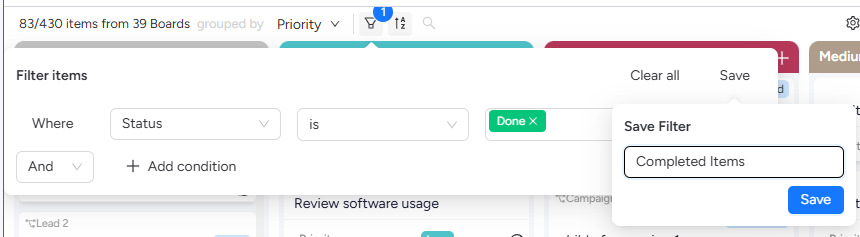
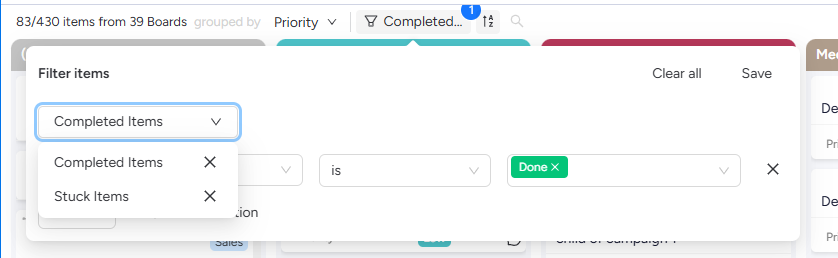
You can now save any combination of filters with a name and come back to it later. Set your criteria, hit save, give it a name, and that filter is available anytime. Switch between saved filters without losing anything. Saved filters are per view and available to everyone who uses that view.
Why it matters
Every time you wanted a different slice of your data, you'd lose whatever filters you had set up. Want to check all items due next week, then switch to see everything completed? That meant rebuilding from scratch. Saved filters let your whole team move between different views of the same board set without the friction.
Kranthi from ThoughtFlow
P.S. We're researching how teams handle automations across multiple boards. If you've set up automations on any of the boards in your Kanban views, I'd love to hear how that's working for you. Just reply "Automations" and I'll follow up.