Multi Board Kanban now supports Me (Dynamic) filter and we're thinking about Multi Board automations
What's new
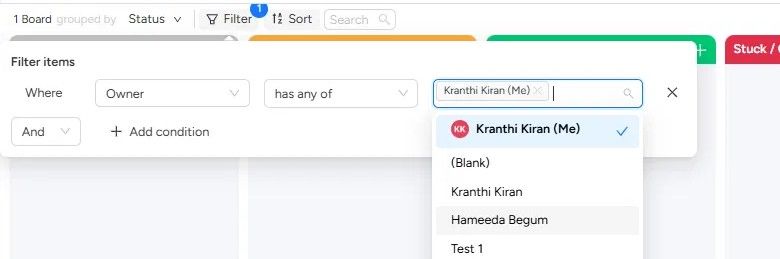
When you filter by a people column (like Owner or Assignee), you'll now see a "Me" option right at the top of the list. Pick it, and the view instantly shows only items assigned to you.
The filter is dynamic: it resolves to whoever is viewing. So on a shared kanban, every teammate can apply the same filter and see their own work. No scrolling through a long list of names to find yourself.
Why it matters
If your team shares a kanban view, you've probably hit this: someone filters the view to their name, and the next person who opens it sees an empty board. They think something's broken, or they waste time resetting the filter. Some teams worked around this by creating separate views for each person, but that means keeping all of them consistent whenever the setup changes. It doesn't scale.
The "Me" filter fixes this at the root. Because it resolves to whoever is looking, the whole team can use the same view with the same filter applied. One person sees their items, another sees theirs. No collisions, no confusion.
That also means this is a view worth bookmarking. Set up your kanban across your boards, clients, or projects, apply the "Me" filter once, and you have a single place to see what's on your plate. Every time you open it, it's already scoped to you.
How to use it
Open your kanban view.
Click Filter in the toolbar.
Set the condition to a people column (Owner, Person, etc.) and choose "has any of."
You'll see your name with (Me) next to it at the top of the list. Select it.
The view now shows only items assigned to you.
Works on any people column, across any boards in the view.
Something we're exploring: Multi Board Automations
One thing we keep hearing from teams running work across multiple boards: automations break when you duplicate them. You set up a recipe on one board, copy it to five others, and within a month they've all drifted. Someone tweaks the trigger on board 3. Someone forgets to add the recipe to board 6. Nobody notices until something falls through.
We're exploring what it would look like to manage automations across boards in one place.
If that's something you'd use, just reply with "Automation" and we'll let you know when it's live.
Kranthi from ThoughtFlow